Cimatron Explorer
The DieQuote Explorer is a quick and easy way to navigate your file system. The display and operation of the DieQuote Explorer is similar to other file manager systems; however, the DieQuote Explorer has additional features to enhance its management capabilities.
DieQuote Explorer has numerous features that can help you to manage your files.
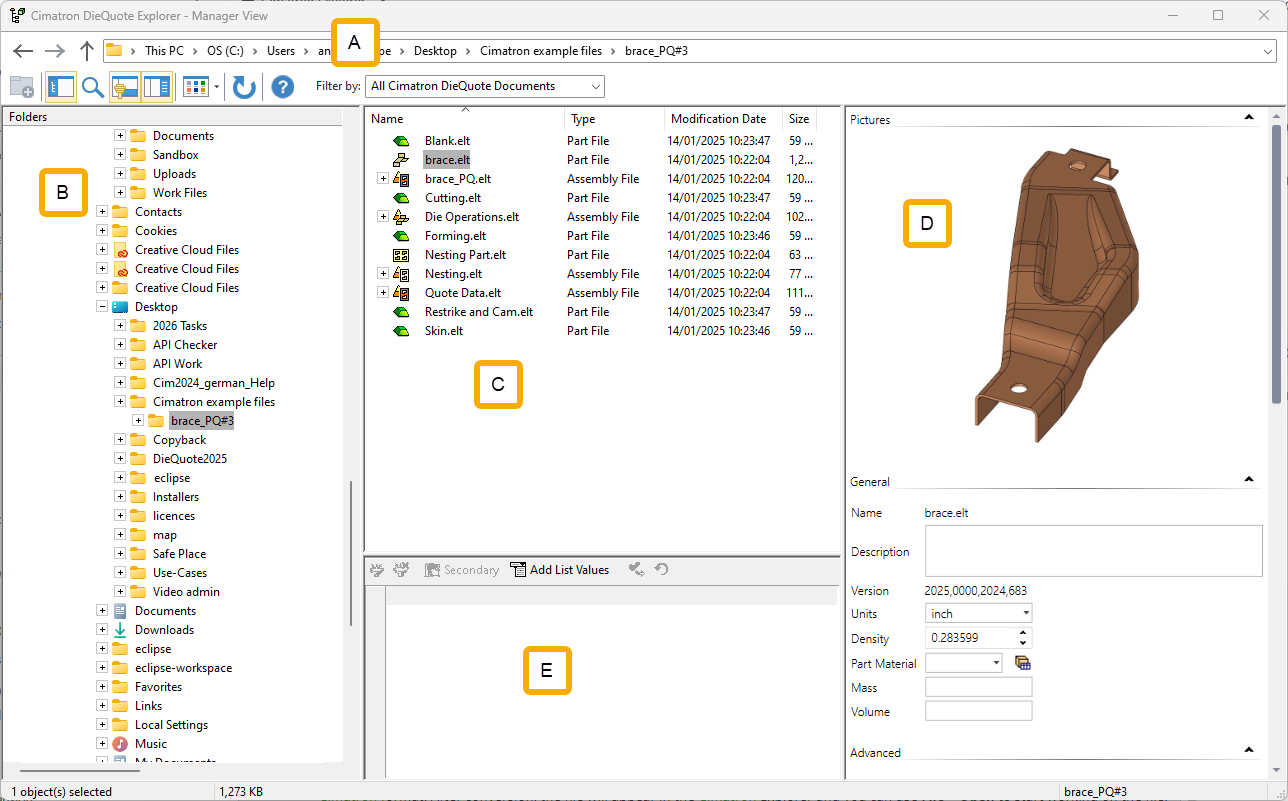
The DieQuote Explorer consists of the following main sections:
|
A |
See the Address Bar / Toolbar explanations. |
|
|
B |
The Folder Tree pane, on the left, displays the folder structure. |
|
|
C |
The File Control pane, upper middle, displays the contents of the folder indicated in the left pane. These include sub-folders and files as defined in the Filter. |
|
|
D |
The Preview and Properties pane, on the right, displays information about the file indicated in the middle pane. Initially, this includes a preview picture of the file and system generated data. You can add additional information that you decide is important in finding/identifying your files. This information can be used as search criteria when looking for a file. |
|
|
E |
Catalog Parameters |
|
Notes:
-
Folders can be created to organize files.
-
If you want to open a file from another format (SAT, IGES, etc.) you must first use File > Import > From File to translate the file into Cimatron format. After conversion, the file will appear in the Cimatron Explorer and you can use File > Open to start working on the file.
-
Various operations are available from the Cimatron Explorer. Some of these can be accomplished using the submenussubmenus. These submenus differ according to the position from where you access them.
