Progressive Die Quote Wizard
Progressive die stamping offers an efficient and cost-effective method for producing parts in large volumes by using multiple stamping stations to carry out simultaneous operations on a sheet metal strip. The die opens and closes with the stamping press, and while the die is open, the metal strip is progressively advanced to the next station. When the metal strip has moved through each station, the finished part is ejected from the die.
The Progressive DieQuote Wizard dialog
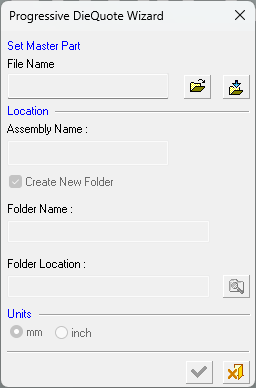
The Progressive DieQuote Wizard accepts a single file as the Master Part for the quotation. When you click the Progressive Die Quote button, the following dialog is displayed.
-
Define the following parameters:
Use the File Name field to select or import the required die assembly file:
-
Open File
 : Open a Cimatron Part or Assembly file (from the Cimatron Explorer) to create a new Die file.
 -
Import File
 : Import an external file (PFM, IGES, SAT, etc.).
The Assembly Name for the die assembly file is automatically created with a 'PQ' (Progressive die Quote) suffix.
-
- In the Folder Name field, accept the default location to save the die assembly file. The folder name is the same as the Assembly name.
Note: The Create New Folder checkbox is marked to add the master part to the project folder, to maintain an organized environment
- In the Units area, select mm or inch as the required units of measurement for the die file.
-
Click the appropriate confirmation button:

OK: Accept the changes, perform the operation, and close the current dialog/task.

Cancel: Cancel all changes and close the dialog/task without saving the settings.
When OK is pressed, the following assembly tree structure is displayed (using the data as shown in the dialog above). Note that the Transfer Die assembly icon is displayed as
 :
: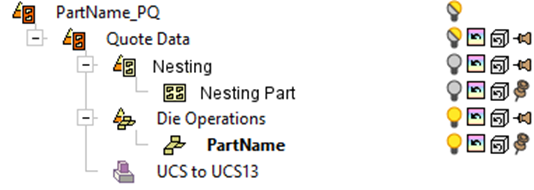
The assembly tree structure will always contain the following two branches:
-
The main assembly is called Quote Data
-
This folder will also have a sub-assembly named Nesting that will hold the strip.
-
The sub-assembly containing forming shapes is called Die Operations
-
-
- When you have populated the required data and click OK, the Progressive DieQuote Wizard will place the Progressive Die Guide toolbar on the right edge of the screen which lists the functions in sequential order to guide you through the die quote process from start to finish.
