Composite Curve
Create a contour from a series of curves/edges.
Create a single 2D or 3D curve by joining two or more curves (lines, edges, splines, etc.).
Composite curves can have the following characteristics:
-
Be Open or closed
-
Contain sharp or rounded corners
-
Be approximated into Nurbs splines
The basic method for creating composite curves is to pick the First and Last curve and combine the picking options to determine which curves will form the required composite curve path.
Note: Composite Curve is an Immediate function, which means that it can be accessed independently or from within another part or assembly function.
Process
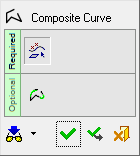
The following image shows the Feature Guide for Composite Curve.
 |
Tip: You can open the Feature Guide at any time by right-clicking the mouse in the graphic display area. |
Required Step 1  : Pick curves (edges, lines, splines, sketches, etc.).
Optional Step 1  : Add or remove corner radii or add a chamfer.
