Composite Curve : Round / Chamfer Corners
Create a contour from a series of curves/edges.
Add or remove corner radii or add a chamfer at the corners of the composite curve.
Optional Step 1 
- Add or remove corner radii or add a chamfer at the corners of the composite curve. The following options are available:
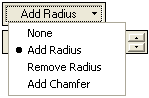
Each option displays a different set of parameters.

Parameters
None
Do not round the corners.
Add Radius
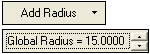
Add a radius to each corner of the composite curve. The Global Radius parameter is displayed, enabling you to define a global radius for all the corners.
To define a different radius to a specific corner(s), pick the appropriate corner(s) and set the radius in the displayed corner flag. For each corner selected, the radius value flag is displayed.
Remove Radius
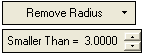
Remove a radius from specific corners of the composite curve. The Smaller Than parameter is displayed, enabling you to remove all radii smaller than the specified value.
Add Chamfer
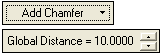
Add a chamfer to each corner of the composite curve. The Global Distance parameter is displayed, enabling you to define a global chamfer for all the corners.
This distance represents the real (smallest) distance between the original vertex and the chamfer result.
To define a different chamfer to a specific corner(s), pick the appropriate corner(s) and set the chamfer in the displayed corner flag. For each corner selected, the chamfer value flag is displayed.
-
Click OKOK
 or ApplyApply
 in the Feature Guide to complete the function.
