Blank 
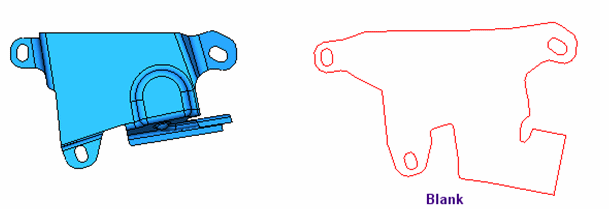
This function uses a finite element enginefinite element engine for blanking a set of adjacent (stitched) faces and creating a flat wire-body. This includes selecting the faces for which to create a wire body result, defining the required parameters, defining the fixed boundaries and transferring entities.
The blanking result is based on a list of parameters such as, material type, thickness, some 2D boundary conditions and more.
Various rules exist when creating a blank. These rules are defined,
-
When using the transfer entities option, faces connected to planar faces can be transferred, unlike faces connected to 3D faces (which cannot be transferred). In addition, wires on edges that are on a planar face are transferred as is (meaning, no changes are made).
-
Edges and entities on 3D faces are recreated as splines.
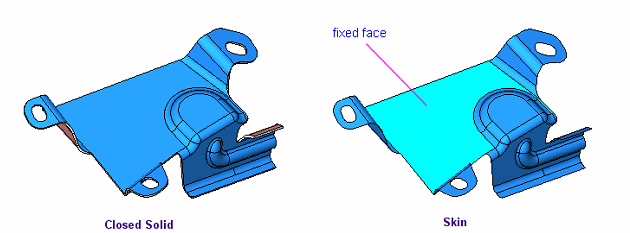
This option enables you to pick a reference face (or a plane) and then a set of adjacent faces to be blanked (the blue faces in the following images), and then define a set of parameters (and/or constraints), as shown in the following example.

Requirements
- Single Part
- Mirror of this part must be identical
- Die Skin step successfully performed (a Blank must have been created). An alert will be displayed if you attempt to use this function before running the Die Skin function.
Important: Only one instance of this function is available in a Die Quote. If the function is used again, it will edit the existing feature.
Process
-
Click the button in the menu on the right hand side of the graphics pane to open the function. The Blank created in the Die Skin step is automatically selected.
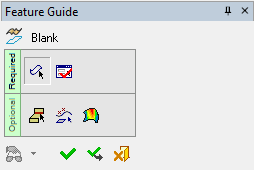
The Feature Guide is shown here.
Tip: You can open the Feature Guide at any time by right-clicking the mouse in the graphic display area.
-
Set the parameters and define the material side. When the Blank is created, the faces are deleted.
