Curvature Map
Map the different curvature radii of faces and then color the faces giving each range of radii a different color.
|
|
|
|
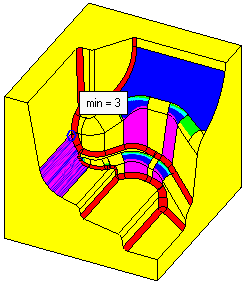
Curvature Map displayed on a part showing the curvature analysis result of different radii of faces. |
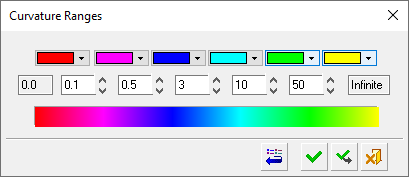
The Curvature Ranges dialog is used to define: The colors that represent specific radii of curvature. The radii that limit the curvature ranges. |
Note: The Curvature Map works on B-rep faces and Mesh objects. For Mesh objects:
- Use the Object Filter from the Quick Geometry Filter to select a Mesh object.
- Due to the faceted nature of Mesh objects, approximate curvature results are obtained.
Process
The following image shows the Feature Guide for Curvature Map.
|
|
Tip: You can open the Feature Guide at any time by right-clicking the mouse in the graphic display area. |
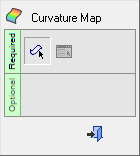
Required Step 1  : Pick the faces or Mesh objects to undergo curvature analysis and then exit.
Required Step 2  : Set the analysis parameters.
