Check & Fix Entities
Analyze the integrity of geometry, view the results, and enable problematic entities to be fixed.
These problematic entities are those with geometric or topological problems that ACIS (the geometric engine) cannot operate correctly.
Using different methods the tool will fix Invalid Entities, Small Faces, Heavy Faces, and Unsmooth Faces.
The Check & Fix Entities dialog is displayed. This dialog contains the following sections:
|
|
On this page:
|
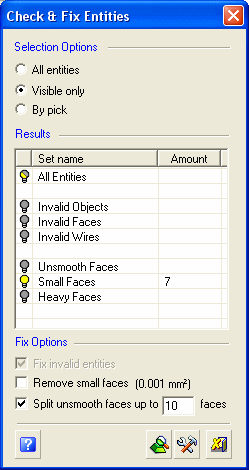


Dialog Structure
The dialog is divided into the following sections:
Selection Options
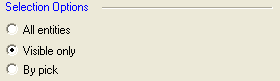
The following selection options are available for checking entities:
|
All entities |
Include all entities in the file. |
|
Visible only |
Include only the visible entities. |
|
By pick |
Pick the entities to be checked. |
Results
This section lists the created sets and the columns detail the type of problematic entity.
When the Check EntityCheck Entity button is pressed, the system checks the part. If problematic entities are found, the following message is displayed. For example:
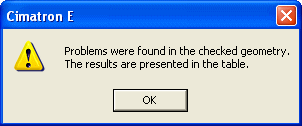
Click OK to display a breakdown of the types of problematic entities. For example:
Click the appropriate Hide  or Show
  button to display the relevant problematic set in the graphic area.
Note: The recorded number of problematic entities may be less than the number of entities displayed since an entity may belong to more than one set (overlap).
Fix Entities Options
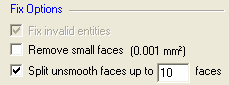
The following options are available for fixing entities:
|
Fix invalid entities |
Fix most of the previously mentioned problems. |
|
Remove small faces |
Remove faces that are smaller than the area defined. |
|
Split unsmooth faces |
Split one or more unsmooth faces at points where the surface is not smooth. The parameter limits the number of faces that can be produced from one face. |
Interaction
-
In the Selection Options pane, select the entities to be checked.
-
Click the Check EntitiesCheck Entities
button to begin the checking process. -
Analyze the results.
-
Based on your analysis of the results, select a strategy in the Fix Options panel and click the Fix Entities buttonFix Entities button
 .
.
The function fixes the problems you specified and automatically re-checks for remaining problematic entities. Depending on the selction in the Fix Options pane, a number of iterations of steps 3 and 4 may be required to fix all the problematic entities.
Dialog Buttons
|
|
Check Entities: Check for problems in the entities specified. |
|
|
Fix Entities: Fix problematic entities according to the selected fix options. |
|
|
Close: Exit the function. |
|
|
Help: Access the Online Help. |
