Add Constraint 
Create constraints between entities.
Constraints are used to eliminate degrees of freedom which can result in a fully constrained sketch. Be aware that adding too many constraints can result in an over-constrained, or even a geometrically impossible sketch.
Constraints can be applied to the following entities:
Notes: Constraints can be applied when creating entities by using Dynamic Constraint Lines.
When you press the Add Constraints button , the Constraint Toolbar is displayed.
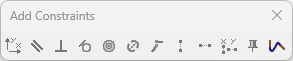
Select the entities you want to constrain, and press the relevant constraint button.
Note: When entities are selected for editing, only the relevant tools on the Add Constraint toolbar are activated. For example, if two lines are chosen for editing, only the tools for actions on lines are available. The Concentric tool, which is used only for circles or arcs, is grayed out.
The Constraint Toolbar provides the following tools:
|
|
Horizontal/Vertical enables you to make lines horizontal (aligned with the X axis) or vertical (aligned with the Y axis). |
|
|
Parallel enables you to make lines parallel to another line. |
|
|
Normal enables you to make a line normal to another line. |
|
|
Tangent enables you to make a circle/arc and a line tangent to each other, or to make two circles/arcs/ellipses tangent to each other. |
|
|
Concentric enables you to make circles/arcs/ellipses concentric to another circle/arc/ellipse. |
|
|
Same Value enables you to assign lines the same length as another line, or to assign circles/arcs the same diameter as another circle/arc. |
|
|
Coincident enables you to make selected lines coincident with one another. |
|
|
Same X enables you to align selected points horizontally to another point. |
|
|
Same Y enables you to align selected points vertically to another point. |
|
|
Same X/Y is similar to the Same X and Same Y options. Same X/Y enables you to align selected points horizontally or vertically to another point. The system automatically calculates the minimum adjustment to align all selected points along X or along Y. |
|
|
Fix enables you to fix entity locations without adding dimensions. |
|
|
Show spline slopes displays the spline slopes so you can modify or constrain them. |


